Printer dialog
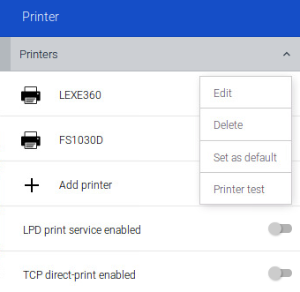
| Option | Description |
|---|---|
| Edit (defined printer) | Opens the Editing printer dialog for the selected printer |
| Delete (defined printer) | Deletes the selected printer |
| Set as default (defined printer) | Defines the selected printer as the default printer |
| Printer test (defined printer) | A test page is printed on the selected printer. |
| + Add printer | Opens the Adding new printer dialog For further information on configuring printers, see Printer configuration in the Scout guide. |
| LPD print service | Allows you to share defined printers with other systems via LPD (within the network) |
| TCP direct print | Select to receive the print data directly via TCP/IP and send it to the printer port (no print formatting, no spooling of print jobs) |
 Contact

