Execute file processing commands
The following features require structured text files that follow the format of .ini files in Windows.The following applies to the text files:
- Each file must contain a section named [FileInfo] where the type of action is defined.
- The information to be processed for this action is specified in a second section named [Setup].
- One file defines one action.Multiple actions require multiple files.
Preparing structured text files
- Create a text file and insert the headers of the sections [FileInfo] and [Setup].
-
Under [FileInfo], insert a line with the string
Type=#
# represents a number between 0 and 13 and specifies the type of action.For further information, see Type of action (FileInfo section). - Under [Setup], insert a line for each mandatory parameter of the selected action.Insert further lines for optional parameters you want to process.Mandatory and optional parameters can be found in the topic describing the relevant action (type).
Example for a structured text file:
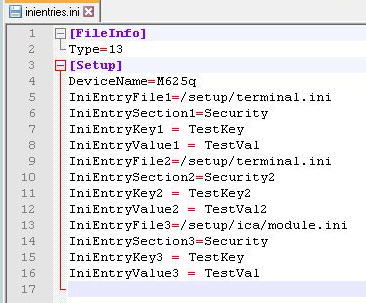
-
Run the program with the following syntax:
scmd -u[ser] Username -p[assword] Password [-d[omain] Domain] <file name 1> <file name 2> <file name 3>
Specify the text files with their file name and file name extension.If a text file is not located in the program directory, also specify the fully-qualified path name.
 Contact

