Adding new licenses
The time of license activation and the purchase date have no dependencies. This allows you to purchase a larger number of licenses in advance. When ordering, divide the number of licenses so that you have the desired number for a specific date in one License Base Key.
New licenses are activated on our portal and then entered in the Scout Console. On your license certificate, you will find one or more License Base Keys. A License Base Key is a 17-digit character string and groups licenses of the same license type:
- Scout Management licenses
- Application licenses (Example: Fluendo System-wide Codec Pack)
- Subscription licenses
Activating and entering licenses is done for one License Base Key at a time.
-
In the Scout Console, under Options > License information, click Add license...
-
In the Add license dialog, in the License key field (1), enter the License Base Key received with the license certificate.
For the specified license key, the license type and number of licenses are shown (2).
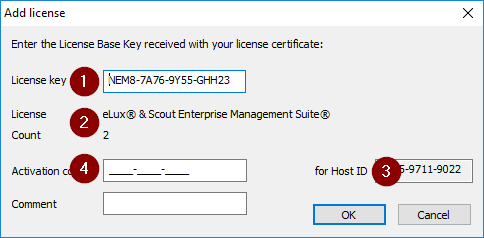
- Copy the Host ID shown on the right (3) into the Clipboard.
-
On our myelux portal, in the Product Activation Center, create an activation code. To do so, use the same License Base Key. For further information, see Generating activation code on our portal.
-
In the Activation code field (4), paste the activation code that you have generated on our portal.
As you can see in the License information dialog, the number of available licenses of the relevant type will increase by the number of new licenses. Depending on the license type, the Subscription period will be extended.
 Contact

